
# Room Statuses
Room Statuses displays the statuses that a room of an order can have. These statuses are used when you change the status of a room from the order page.
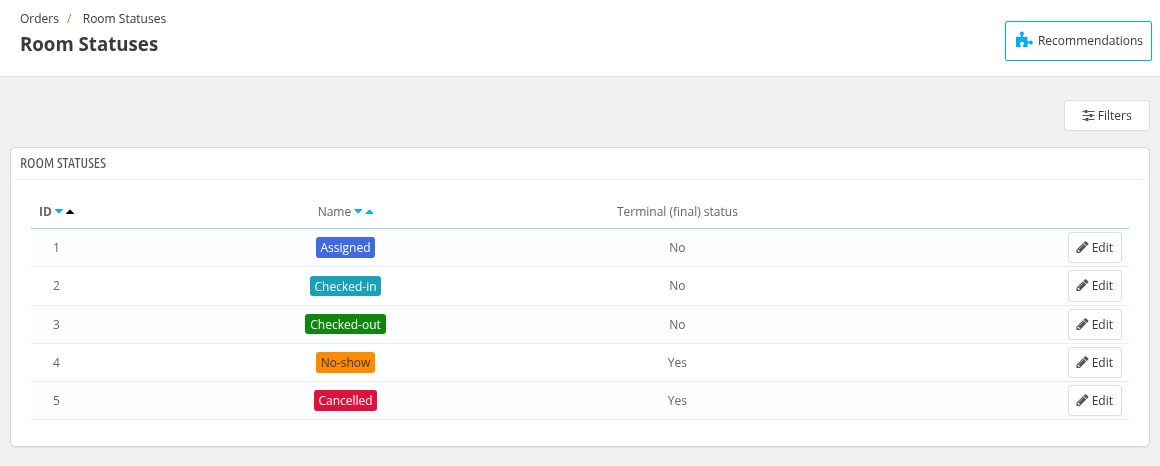
The list displays the following details:
- ID : ID of the status.
- Name : Name of the status with its color. The statuses are Assigned, Checked-in, Checked-out, No-show and Cancelled.
- Terminal (final) status : Yes if a room with this status cannot be edited, only deleted. No if the room can still be edited.
Note: Room statuses cannot be added or deleted.
# Edit a Room Status
Click on Edit to edit a status.
- Name : Enter the name of the status.
- Color : Select the color of the status.
- Terminal (final) status : This setting can be changed only for the No-show status. If it is Yes, a room with this status cannot be edited, only deleted. If it is No, the room status can still be changed, for example to undo an accidental no-show or for a late check-in. For the other statuses it is fixed and cannot be changed.
Click on Save to save the changes.